Sending gender reveal invitations online takes about fifteen minutes once you know the six steps: choose where to send from, pick a design that keeps the secret, drop in your wording, add a boy-or-girl guess question to the RSVP form, deliver by email or text, and watch the replies and guesses collect themselves. This guide walks each step in order, shows the whole loop on one worked example, then covers timing, cost, and the questions hosts ask most. The reveal itself may run on cake, confetti, or a very dramatic balloon, but the invitation is where the suspense starts, and where your headcount and the guessing game are settled before anyone arrives.
How to Send Gender Reveal Invitations Online in Six Steps
Step 1: Choose where you'll send from
An online gender reveal invitation needs a platform that does three things: delivers a designed invitation to each guest, collects the reply on the invitation itself, and lets you ask a question with the RSVP so guests can cast a guess. Greenvelope's gender reveal party invitations are built for exactly this: designs created by independent artists, with no AI-generated artwork in the collection, delivered inside an animated envelope on an ad-free page, with RSVP tracking and custom questions included, at one flat price per mailing starting at $19 for a guest list of up to 20 people. A general design tool can make you a beautiful image, but an image still has to be delivered, tracked, and replied to by hand; a sending platform does all three in the same place. For a side-by-side of the platforms that do, our roundup of the best gender reveal invitation platforms compares seven of them on design, delivery routes, RSVP depth, ads, and price, including the ones that sell you a file and leave the replies to you.
Step 2: Pick a design that keeps the secret
The design has the same job as the wording: build suspense, reveal nothing. Neutral palettes, question marks, and pink-and-blue designs that play both sides all work, and every Greenvelope design is customizable, so you can shift colors and type to match your theme without tipping the answer. If you have your own artwork, upload it as a .jpg, .png, or PDF and it is delivered inside the same animated envelope with the same RSVP tools. If the party doubles as a shower, the baby shower and gender reveal designs share one collection, so a combined invitation matches either framing.
Step 3: Write the wording
The invitation needs the parents-to-be, the boy-or-girl question in your party's tone, the date, time, and location, an RSVP deadline with one clear way to reply, and any team colors or guessing instructions. Our gender reveal invitation wording guide has copy-ready examples for classic, funny, Team Pink vs. Team Blue, combined shower-and-reveal, and virtual parties; pick a set of lines, paste them in, and adjust the names and details. The one rule that has no exceptions: the answer stays off the invitation.
Step 4: Add the boy-or-girl guess to the RSVP form
This is the step that turns the invitation into the party's first game. On Greenvelope, add a custom question to the reply form, "Cast your guess: boy or girl?", and guests answer it as they RSVP. Each submitted guess saves with that guest's reply in your dashboard, so the guesses are on record before the party starts and you can crown the winning team the moment the color lands. The same form takes any other question you need, a dish for a potluck reveal or an arrival window for an open house, and our guide to adding custom questions to an online RSVP covers the formats. One boundary worth knowing: guesses ride on the reply, so the question belongs on the invitation's RSVP rather than anywhere gifts or logistics would crowd the card.
Step 5: Import your guest list and send
Add guests by pasting email addresses, importing a spreadsheet of contacts, or pulling them from a past event's address book. Then choose the route: email, text message, or a shareable link for the family group chat, with the same envelope opening and the same RSVP on every route. Send immediately, or schedule the send for the morning you want the suspense to start; for email and text sends, per-guest delivery status shows you exactly who has received and opened their invitation.
Step 6: Track replies and tally the guesses
Replies collect on the mailing's Track step in real time: who is coming, how many they are bringing, and, saved to each guest's record, the guesses submitted with the replies. RSVP reminders can be scheduled there to go by email only to guests who have not answered as your deadline nears, so you are not chasing stragglers by hand. Need to move the start time or add a parking note? Guest messaging reaches everyone, or only the yeses, from the same place. By party day you have a headcount for the cake order and the submitted guesses on record, ready to count for the scoreboard.
Example: From a Gender Reveal Invitation to a Tracked RSVP
Here is what the six steps produce on one concrete invitation. The hosts, the event, and the guests below are fictional. The design is a real Greenvelope invitation, and the setup steps, question formats, and reply labels described here follow Greenvelope's product documentation, linked where each appears; the table at the end is an illustrative summary, not the product interface.
The configured invitation
Carly and Theo Bennett build their party on Boy or Girl, a Greenvelope gender reveal invitation by designer Carmia C.: turquoise and pink baby onesies on a soft gray scalloped background, artwork that plays both teams without tipping the answer. It delivers by email, text message, or shareable link inside the animated envelope, so it supports every step above as written.
 The Boy or Girl design as it appears on its Greenvelope design page, shown before the Bennetts' wording is added.
Their completed wording, pasted into the card:
He or she? Come find out with us.
Saturday, November 14, 2026, 2:00 to 4:00 p.m., the Bennetts' backyard, 118 Juniper Lane.
Wear your team's color, and cast your guess when you reply.
Please RSVP by November 7.
On the Details step, in the RSVP Page section, Carly clicks Add a New Question under Survey Questions, which is where Greenvelope keeps custom RSVP questions. She adds the prediction as a radio button question, the single-select format, so a replying guest can select one answer: the question reads "Cast your guess: boy or girl?" and its two answer options are "Boy" and "Girl". The reply buttons stay on Greenvelope's default labels, Will Attend and Will Not Attend, the RSVP deadline is set to November 7, and the invitation goes out by email on October 24, three weeks ahead of the party.
The guest's reply
Maya Chen opens the email that afternoon, watches the envelope open, and taps Will Attend, replying for herself as one attendee. Custom questions appear on the RSVP page immediately after a guest selects a response status, so the guess question comes up next; Maya selects Girl and submits her reply. Her answer is saved to her guest record along with her RSVP, which is the whole point of Step 4: the guess rides on the reply, so casting it takes her one extra tap and no account.
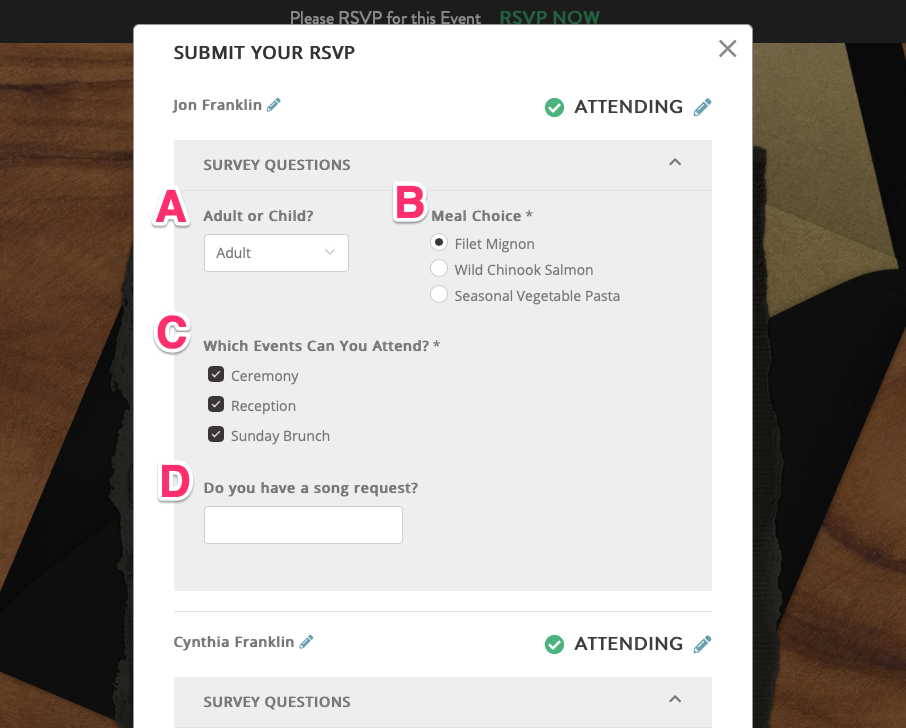 Reference example from Greenvelope's help center: custom questions on a demonstration event's RSVP page, shown for orientation rather than as the Bennetts' configured invitation.
The host's record
Every response is recorded on the mailing's Track step, where Carly filters the guest list by RSVP status to see who has accepted, who has declined, and who has not answered yet. Maya now appears among the accepted replies, and her Girl answer is saved to her guest record along with her RSVP. Here is where the fictional event stands once two more replies arrive:
Illustrative summary of fictional responses; not a reproduction of the Greenvelope interface.
| Guest |
Reply |
Attendees |
Submitted guess |
| Maya Chen |
Will Attend |
1 |
Girl |
| Jonah Price |
Will Attend |
1 |
Boy |
| Elise Tran |
Will Attend |
1 |
Girl |
In this fictional example, each guest replies for themselves and submits one prediction. The three accepted replies represent three attendees. Counting the submitted predictions manually gives two for Girl and one for Boy. When the deadline passes, the download icon at the bottom of the Track guest list exports the guest list and RSVP responses to Excel or CSV, a copy for whoever is baking the cake.
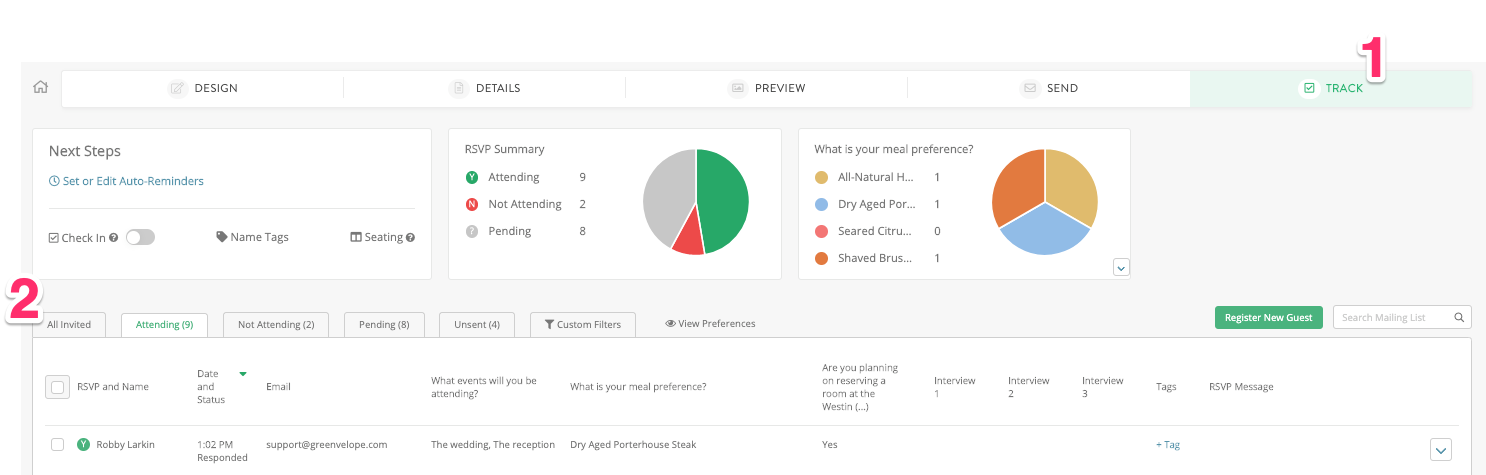 Reference example from Greenvelope's help center: the Track step for a demonstration event, shown for orientation rather than as the Bennetts' guest list.
Choosing Between Email, Text, and a Shareable Link
All three routes deliver the same invitation, so the choice is about your guest list. Email is the default for a mixed list of family and friends, and it gives grandparents something to forward proudly. Text message wins for younger guests, tight timelines, and anyone who treats their inbox as a lost cause; the invitation opens from the message with nothing to download. The shareable link is the answer for the group chat that already exists, drop it once and everyone replies from the same card. Mixing routes on one guest list is normal, a Greenvelope mailing tracks the reply and the guess identically whichever way each guest received it, so pick per guest rather than per party.
Sending Invitations for a Virtual Reveal
When the reveal happens on camera, the invitation carries one more load-bearing detail: the stream link. Put it on the invitation itself rather than promising to text it later, state the time zone plainly for a scattered family, and schedule the send so every household gets the same runway. The guess question matters even more at a distance, since casting a vote is how remote guests take part before the confetti pops, and the RSVP tells you exactly who plans to be watching so nobody's call goes unanswered at the big moment.
When to Send Gender Reveal Invitations
Send gender reveal invitations 2 to 3 weeks before the party, stretching to 3 to 4 weeks if guests are traveling, and set the RSVP deadline about a week out. Reveals are planned on shorter notice than showers, and digital delivery is what makes the tight runway comfortable: the invitation lands the moment you send it, and the reminder schedule does the follow-up for you.
What It Costs to Send Gender Reveal Invitations Online
A Greenvelope mailing is one flat price for the whole mailing, set by guest-count tier and starting at $19 for a guest list of up to 20 people, with the design, email and text delivery, RSVP tracking, custom questions, and reminders all included; there is no subscription required and no coins to buy, and paid accounts include an initial 500 text messages, with more available to purchase. You can build and preview any invitation, and trial-send it to up to 10 people, with no credit card required, which is enough to test the guess question on your own phone before the real send.
Frequently Asked Questions
What is the best way to send gender reveal invitations online?
The best way to send gender reveal invitations online is through a platform that delivers a designed invitation and collects the RSVP on it. Greenvelope sends by email, text message, or a shareable link, with designs by independent artists, an animated envelope opening, an ad-free guest experience, and a boy-or-girl guess question built into the reply form, at one flat price per mailing starting at $19 for a guest list of up to 20 people.
Can you send gender reveal invitations by text message?
Yes. Greenvelope delivers gender reveal invitations by text message as well as email and a shareable link, and every route carries the same animated envelope, the same RSVP, and the same guess question. Text suits younger guest lists and last-minute reveals, and email and text sends both show per-guest delivery status, so you can see who has opened their invitation.
Do guests need an account to RSVP to a gender reveal invitation?
Not on Greenvelope. Guests open the envelope and reply right on the invitation, casting their boy-or-girl guess on the same reply form, with no account and no app required. Replies and guesses appear in the host's dashboard in real time, attached to each guest's name.
How do you collect boy-or-girl guesses before the party?
Put the question on the RSVP form. On Greenvelope, add a custom question such as "Cast your guess: boy or girl?" and guests answer it as they reply, so each submitted guess arrives attached to that guest's response. Count the answers in your dashboard before the party and you can announce which team called it the moment the reveal lands.
How late is too late to send gender reveal invitations?
The comfortable window is 2 to 3 weeks before the party, but a gender reveal is a casual celebration, and a week's notice is workable when the guest list is close family and friends. Under a week, expect thinner attendance and say so warmly in the wording; the reveal moment matters more to most guests than the runway did.
Do gender reveal invitations need an RSVP deadline?
Yes, about a week before the party. The deadline is what sizes the cake order, the confetti, and the chairs, and it gives the guessing game a closing bell. On a Greenvelope invitation the deadline sits on the reply form, and RSVP reminders can be scheduled to reach only the guests who have not answered as it approaches.
How much does it cost to send gender reveal invitations online?
Greenvelope is not free, and it is not a subscription either: a mailing is one flat price by guest-count tier, starting at $19 for a guest list of up to 20 people, with delivery, RSVP tracking, the guess question, and reminders included. You can preview any design and trial-send to up to 10 people with no credit card required before paying for the full list.
Can you use the same guest list for the gender reveal and the baby shower?
Yes. On Greenvelope your guest list saves to your address book, so the shower invitation starts from the reveal's list instead of a blank spreadsheet, trimmed or extended as needed. The two collections share matching design families, and replies for each event track separately, so the headcounts never blur.
Related Resources